A5 Open Notebook Mockup: Realistic Design Showcase
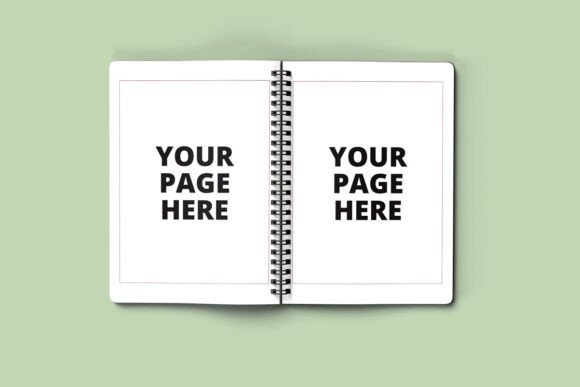
The A5 Open Notebook Mockup is a powerful tool for designers, creators, and entrepreneurs looking to present their notebook designs in a professional and realistic way. Whether you're preparing a client presentation, updating your portfolio, or listing products online, this mockup offers a high-quality visual representation of your work. With its detailed open view and customizable features, it's an essential addition to any designer's toolkit.
One of the standout features of the A5 Open Notebook Mockup is its high-resolution image at 3000 x 2000 pixels. This ensures that every detail, from the texture of the cover to the lines on the inner pages, appears crisp and lifelike. The realistic spiral binding adds to the authenticity, making it easy for viewers to imagine how the final product will look in real life.
Key Features of the A5 Open Notebook Mockup
This mockup comes with several features that make it both versatile and user-friendly. First, it includes a “How to Use” PDF guide, which walks you through the process of editing the mockup in Photoshop. This is especially helpful for those who may not be familiar with smart objects or layer organization in PSD files.
- High resolution 3000 x 2000 px
- “How to use” PDF guide included
- Easy-to-use smart objects for quick design insertion
- PSD JPEG files provided
- Notebook size A5
- Customizable spiral binding color
- Well-organized PSD layers for seamless editing
The ability to customize the spiral color is a major advantage, as it allows you to match the mockup to your brand’s color scheme. This level of personalization makes it ideal for businesses that want to maintain a consistent visual identity across all materials.
Practical Applications for the A5 Open Notebook Mockup
The A5 Open Notebook Mockup is not just a design tool—it's a practical solution for a wide range of users. For professionals such as marketers, educators, and entrepreneurs, it provides a polished way to showcase their work. For example, a teacher might use the mockup to demonstrate a new lesson plan notebook to colleagues or students. A marketer could use it to present a new product line to clients or stakeholders.
Freelancers and small business owners can also benefit from this mockup when creating online listings or social media content. By using the A5 Open Notebook Mockup, they can present their designs in a more engaging and professional manner, which can help increase customer interest and trust.
For creative professionals like illustrators, writers, and artists, the mockup offers a way to visualize their work in a physical format. This can be especially useful when pitching ideas to publishers or clients who prefer tangible examples over digital mockups.
Benefits of Using the A5 Open Notebook Mockup
Using the A5 Open Notebook Mockup can enhance several aspects of your workflow. From a usability standpoint, the well-organized layers in the PSD file make it easy to edit and update the design without disrupting the overall layout. This saves time and reduces the risk of errors during the editing process.
In terms of efficiency, the smart objects allow for quick design insertion, which means you can experiment with different layouts and styles without having to recreate the entire mockup from scratch. This flexibility is particularly valuable when working under tight deadlines or when testing multiple design concepts.
The appearance of the mockup is another key benefit. Its realistic textures and spiral binding create a professional look that can elevate the perceived value of your notebook designs. This is especially important when presenting to clients or when showcasing your work in a portfolio.
Realistic Examples and Use Cases
Imagine a scenario where a startup is launching a new line of planners. They can use the A5 Open Notebook Mockup to create visually appealing product images for their website and social media. By customizing the spiral color to match their brand, they can ensure consistency across all marketing materials.
Another example is a freelance writer who wants to sell their journaling notebooks online. By using the mockup, they can display the inner pages of their notebooks in a realistic way, giving potential buyers a clear idea of what to expect. This can lead to higher conversion rates and better customer satisfaction.
For educators, the A5 Open Notebook Mockup can be used to create sample lesson plans or student workbooks. It allows them to visualize how the final product will look and feel, which can help in planning and organizing classroom activities more effectively.
Considerations When Using the A5 Open Notebook Mockup
While the A5 Open Notebook Mockup is a powerful tool, there are a few considerations to keep in mind. First, it requires Adobe Photoshop to edit, so users must have access to this software. If you don’t have Photoshop, you may need to find a workaround or use a similar program that supports PSD files.
Additionally, the files are not to be resold or given out as a freebie. This means that if you’re using the mockup for commercial purposes, you should ensure that you have the proper rights and permissions. It’s also important to respect the terms of use to avoid any legal issues down the line.
Finally, while the mockup is highly customizable, it’s still a template. You’ll need to invest time and effort into designing the inner pages and other elements to ensure that the final result meets your expectations. However, the time spent on customization is often well worth it, given the professional quality of the final output.
The A5 Open Notebook Mockup is a valuable resource for anyone involved in design, branding, or product presentation. Its realistic visuals, customizable features, and practical applications make it a must-have for professionals and creatives alike. Whether you're showcasing your work to clients, updating your portfolio, or launching a new product, this mockup can help you achieve a polished and professional look.