How to Use an Abstract Boho Frame Background in Your Creative Projects
Whether you are designing an invitation for a boho-themed wedding, creating social media graphics for a lifestyle brand, or assembling a scrapbook page, the visual foundation you choose can make or break the final piece. An Abstract Boho Frame Background offers a versatile starting point that blends organic textures, geometric hints, and earthy colour palettes. Unlike a generic border, this background is built with artistic intent and high-resolution clarity, making it suitable for both digital and print workflows.
In practical terms, a well-crafted boho border background is more than a decorative element. It is a reusable asset that can streamline your design process, maintain visual consistency across multiple deliverables, and save hours of manual composition. The file specifications—2000×2000 pixels, 300 DPI, RGB colour—ensure that it works seamlessly in professional software, social media platforms, and print production.
Understanding the Abstract Boho Frame Background
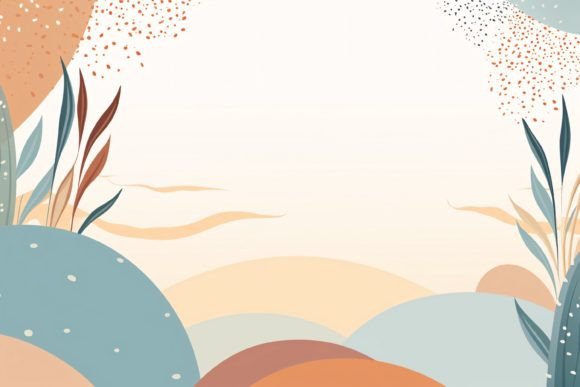
The term Abstract Boho Frame Background refers to a digital image that combines a border or framing effect with a boho aesthetic. The background area inside or around the frame is often filled with abstract patterns, faded watercolour washes, mandala-like lines, or subtle geometric elements. This type of background is intentionally non-literal, giving you freedom to layer text, photos, or icons without visual conflict.
Because the file is delivered as a JPG at high resolution, it is ready for immediate use. You do not need to extract layers or adjust transparency settings unless you want to blend it with other assets. The 2000×2000 px size covers most standard social media dimensions (Instagram, Facebook, Pinterest) and leaves room for cropping in custom projects. The 300 DPI resolution guarantees sharp output up to approximately 6.7×6.7 inches in print, which is ample for an A5 card, a small poster, or a greeting card.
To get the most out of this resource, treat it as a design component that you integrate into a broader workflow rather than a standalone decoration. Its value emerges when you combine it with other tools, methods, and decisions.
Where the Abstract Boho Frame Background Fits in a Workflow
Design projects typically move through several phases: planning, asset preparation, composition, refinement, and output. The Abstract Boho Frame Background can be introduced at nearly every stage, depending on your project type.
Planning and Conceptualisation
During the planning phase, you might be exploring visual directions for a client or a personal project. Having a high-quality boho border background on hand can help you quickly mock up a mood board or a concept layout. For example, if you are brainstorming invitation designs for a bridal shower, drop the background into a new Canva or Photoshop document, overlay placeholder text and a photo, and you have an instant prototype. This reduces the time spent on creating a border from scratch and lets you focus on aligning the overall tone with your creative brief.
Asset Preparation
When you are gathering visual assets, the boho border background acts as a base layer that you can customise further. You may want to duplicate the file and adjust its colour balance to match a specific palette using tools like Adobe Lightroom or the Hue/Saturation adjustment in Photoshop. Because the file is RGB, colour adjustments are straightforward. If your final output is digital (web banners, social media posts, blog headers), you can use the background as is. For print, you may want to convert to CMYK later, but the initial work in RGB lets you maintain vibrancy during editing.
Composition and Layout
This is where the background interacts most directly with other elements. The abstract nature of the boho border means it works well with both centred and asymmetrical layouts. You can place your main subject inside the frame, letting the border guide the viewer’s eye. If you are designing a greeting card, the background provides a balanced enclosure for your message. For a scrapbook page, you might combine it with patterned paper overlays or washi tape accents. The key is to treat the border as a container that adds structure without overpowering your content.
Refinement and Quality Control
Before finalising a project, check how the background interacts with your typography and imagery. Because the file is 300 DPI, zooming in at 100% reveals the level of detail. You can assess whether the abstract patterns distract from readability. If necessary, apply a subtle blur or a semi-transparent overlay to reduce contrast. Another practical tip: use the background as a template to ensure consistent branding across multiple graphics. For example, if you run an Instagram campaign with five posts, using the same boho border background with different foreground elements creates a cohesive series that followers recognise instantly.
Output and Distribution
For social media, the 2000×2000 px size gives you room to crop to 1:1, 4:5, or even 16:9 without losing the framing effect. For print, export your final composition at 300 DPI and confirm that the border fits within the bleed and safe zones of your chosen paper size. Many print-on-demand platforms like VistaPrint or Printful accept JPG files directly, and the high resolution of this background means you can produce sharp physical products, from business cards to home decor art prints.
Practical Implementation Tips
To integrate an Abstract Boho Frame Background smoothly into your routine, consider the following factors.
Preparation and Organisation
Store the JPG file in a dedicated folder for design assets. Name it clearly, for example “Boho_Frame_Background_2000.jpg”, so you can locate it in a busy library. If you use a digital asset management tool like Adobe Bridge or a simple cloud folder, tag it with keywords “boho” “frame” “background” “border” for quicker search.
Compatibility with Software and Platforms
The JPG format is universally supported. You can open it in any raster-based design program (Adobe Photoshop, Affinity Photo, GIMP, Canva, Procreate on iPad, etc.). It also works directly in presentation software like PowerPoint or Keynote for quick mockups. For vector-based work, you can place the JPG as a linked image in Adobe Illustrator or InDesign, being mindful that vector programs treat it as a raster object.
Usability Across Project Types
- Invitations and Greeting Cards: Add text inside the frame. Use a script font for a romantic feel or a clean sans-serif for modern addresses.
- Web Banners and Social Media Graphics: Scale the background to fit your canvas. Add a logo and call-to-action button in a contrasting colour.
- Home Decor Items: Print the background on matte paper and frame it, or layer it into a digital collage for a wall art download.
- Photo Albums and Scrapbooks: Place a photo behind the border (blending mode: multiply) or inside a mask for a framed effect.
- Business Cards: Use the background on one side of a card. Pair with a clean back side for contact details.
Each use case benefits from the background’s ability to provide a visual anchor without requiring additional border creation.
Efficiency and Consistency
If you produce multiple pieces for an event series (e.g., save-the-date, invitation, thank-you card, menu), using the same Abstract Boho Border Frame Background across all items creates a unified identity. This reduces decision fatigue: you only need to adjust the foreground content. For recurring projects, you can even create templates in your design software that reference this background layer, so every new project starts with a consistent base.
Long-Term Use and Maintenance
Because the file is a high-resolution JPG, its quality remains stable over time. Unlike PSD files that may rely on linked assets or fonts, this background is self-contained. You can archive it and reuse it years later without worrying about software version compatibility. To extend its life, consider creating variations: adjust the hue or add a gradient overlay to match evolving brand colours. You can also combine it with other boho abstracts, such as separate floral swatches or geometric scatter elements, to build a library of backgrounds without starting from scratch.
Quality control is straightforward. Since the resolution and colour space are fixed, you only need to check for compression artefacts if you share the file multiple times. Save copies of the original for print and create separate lower-resolution versions for web previews.
Useful Observations for Creators and Marketers
From a practical standpoint, the Abstract Boho Frame Background saves time precisely because it eliminates the need to construct both a border and a background texture. Many designers spend twenty to thirty minutes per project just framing content. With this asset, that step becomes a one-click placement. For small business owners managing their own marketing, this efficiency translates directly into more time for customer engagement or product development.
Moreover, the boho style has a broad appeal across age groups and niches. It works for wedding stationery, yoga studio branding, children’s party invitations, and even blog headers for lifestyle sites. By keeping an abstract rather than literal design, the background avoids feeling tied to a specific theme, making it a flexible long-term investment.
When you purchase or download a file like this, you are not just acquiring a picture. You are acquiring a workflow enabler. The question is not whether to use it, but how to integrate it into your existing processes so that it complements your skills and tools. Start by identifying one upcoming project—whether it is a birthday invitation, a Pinterest graphic, or a client proposal—and use the Abstract Boho Frame Background as your starting canvas. You will likely find that it blends into your routine faster than you expect, and that the border becomes a natural part of your creative process.