Probably Late for Something: Why This Digital Asset Kit Belongs in Your Workflow
Every creative project hits a moment where the deadline feels closer than the finish line. Whether you are designing a custom T-shirt for an event, formatting a client presentation, or prepping files for a weekend craft market, the gap between idea and output often comes down to one thing: having the right asset in the right format at the right moment. That is precisely where Probably Late for Something enters the picture. This digital download pack delivers a single cohesive design across five industry-standard file formats, giving you the flexibility to move between tools, platforms, and production methods without rework.
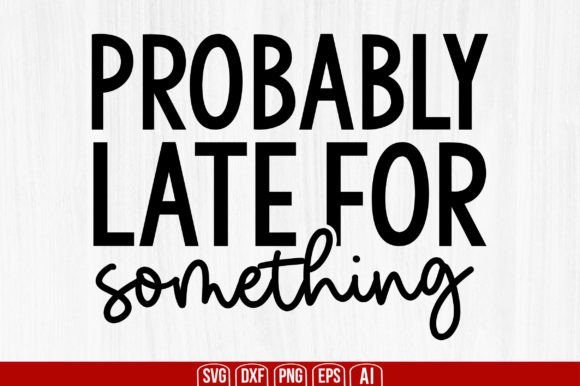
When you purchase this product, you receive a single .zip file containing one SVG, one PNG, one EPS, one DXF, and one JPEG file. There is no physical product shipped. What you get is a ready-to-use creative asset that is compatible with Cricut, Silhouette, Inkscape, Adobe Photoshop, and Adobe Illustrator. The design itself carries a tone that is self-aware, slightly humorous, and highly relatable — the kind of phrase that resonates with anyone who juggles multiple responsibilities and still makes time to create. But beyond the message, the real value lies in how the file pack fits into your actual workflows.
What You Actually Receive and Why Format Variety Matters
Digital asset packs often promise flexibility, but the proof is in the file list. A single SVG can carry you through vector editing, but if you need a high-resolution raster for a quick mockup or a DXF for a specific cutting machine, you are stuck converting — and conversion always introduces risk. Fonts shift, paths break, and stroke weights change.
With Probably Late for Something, the five formats remove that friction entirely:
- SVG (Scalable Vector Graphic): Ideal for Cricut Design Space, Silhouette Studio, Inkscape, and web use. Scales infinitely without quality loss.
- PNG (Portable Network Graphic): A transparent-background raster file ready for use in social media graphics, presentations, quick print layouts, or layering in Photoshop.
- EPS (Encapsulated PostScript): A legacy vector format widely supported in professional design and print workflows. Opens cleanly in Adobe Illustrator and many layout applications.
- DXF (Drawing Exchange Format): Essential for users of certain cutting machines, laser engravers, and CAD-adjacent creative tools. Often required for precise path-based cutting.
- JPEG (Joint Photographic Experts Group): A standard, universally viewable raster format for sharing drafts, previewing with clients, or using in documents where transparency is not needed.
Having all five in a single download means you do not need to open a converter, re-export, or troubleshoot compatibility issues. You work in your primary tool, grab the format that matches your current output method, and move forward.
Where Probably Late for Something Fits in Your Creative Process
The phrase itself suggests a lighthearted relationship with deadlines, but the file pack supports serious, structured workflows. Here is how it integrates before, during, and after common production stages.
Pre-Production Planning and Asset Selection
Before you start a project, you typically assemble components: fonts, color palettes, base graphics. Probably Late for Something works as a thematic anchor. If you are designing a series of products or materials around a specific mood — casual, honest, slightly chaotic — this design can serve as the central piece. You can load the SVG into Illustrator or Inkscape, adjust colors to match your brand or event palette, and then export derived versions. Because the vector is clean, you can scale it for a small sticker or a large banner without redrawing anything.
During planning, you also need to consider output path. If you are cutting vinyl with a Cricut Maker 3, you will use the SVG or DXF. If you are printing transfers with a sublimation printer, the PNG with transparency is your starting point. Knowing the formats exist before you start prevents mid-project format scrambling.
During Execution: Working Across Tools and Machines
One of the most common workflow splits is between screen-based design and physical production. You might design a layout in Adobe Photoshop, then bring the vector paths into Silhouette Studio for cutting. With the Probably Late for Something pack, you skip the export/import guesswork. The SVG imports directly into Silhouette Studio with paths intact. The PNG layers into your Photoshop composite without background cleanup. The EPS opens natively in Illustrator for precise node editing.
For users who run multiple machines — a Cricut for vinyl, a Glowforge for laser cutting, a standard inkjet for paper prints — having DXF and EPS alongside the more common formats saves minutes per file transfer. Over a production run of twenty items, those minutes compound into real efficiency gains.
Post-Project Archiving and Repurposing
After a project wraps, the asset does not become obsolete. You can archive the original .zip in your design library, and six months later, pull the SVG out for a reorder or a new application. Because the design is a standalone phrase rather than a date-specific graphic, it stays relevant across seasons and campaigns. Store it in a folder labeled by theme or by format type, and you have a reusable resource for future merchandise, signage, or digital content.
Practical Implementation Tips for Different Use Cases
The real power of a digital download pack emerges when you adapt it to your specific environment. Below are workflow examples for several common user types.
For the Small Business Owner Selling Custom Merchandise
You run an Etsy shop or a local brand selling apparel, mugs, and totes. Your production pipeline involves designing in Illustrator, sending SVGs to a heat press vinyl cutter, and photographing finished goods for listings. Use the EPS file to create your master design, then export the SVG for your cutting machine. The JPEG works for quick mockup photos or for uploading as a listing image placeholder. Keep the PNG on hand for any social media posts promoting the item.
Quality control tip: Open the DXF in your cutting software before committing material. Check that the paths are continuous and that no tiny gaps will cause weeding issues. With this pack, the design is pre-optimized, but it is always good practice to preview scaled versions at your intended cut size.
For the Educator or Workshop Leader
If you teach a class on Cricut projects, Silhouette basics, or vector design, Probably Late for Something can serve as a teaching file. The design is simple enough for beginners to manipulate — change color, resize, weld text — but interesting enough to keep their attention. Distribute the SVG to students who use Cricut, the DXF to those with older Silhouette models, and the PNG to anyone working on digital mood boards. One file pack, multiple learning paths.
For the Freelance Designer with Mixed-Format Clients
Clients often request assets in specific formats, and you cannot always control what their production team uses. When you purchase Probably Late for Something, you are essentially buying a multi-format insurance policy. If one client needs a transparent PNG for a website hero image and another needs an EPS for a brochure, you deliver from the same source without rework. This consistency reduces errors and keeps your project timeline predictable.
Compatibility and Usability Across Platforms
This file pack is explicitly designed for cross-platform use. Let us break down what that means in practical terms:
- Cricut Design Space: Upload the SVG directly. No resizing quirks. The design appears as a single layer that you can cut, draw, or score.
- Silhouette Studio: The DXF format often produces cleaner path results for older Silhouette machines. The SVG also works for newer versions.
- Inkscape: Open the SVG or EPS. Inkscape handles both formats natively, allowing you to edit nodes, change fill and stroke, and export to your preferred output format.
- Adobe Photoshop: Use the PNG with transparency for layered comps, or open the EPS as a smart object for resolution-independent editing.
- Adobe Illustrator: The EPS is the native-looking choice. The SVG also opens with full vector fidelity.
No file format pack can guarantee zero issues across every software version and operating system, but this set covers the vast majority of creative workflows. If you primarily work in an iPad app like Procreate or Affinity Designer, the PNG and SVG will handle most of your needs.
Organizing Your Digital Assets for Long-Term Use
A single download is easy to lose in a cluttered Downloads folder. To get lasting value from Probably Late for Something, build a small organizational habit. Create a master folder on your cloud storage or local drive called “Design Assets – Phrases & Quotes.” Inside, place a subfolder named “Probably Late for Something” and extract the .zip contents there. Rename the files with a consistent convention, for example:
- probably-late-something_svg.svg
- probably-late-something_png.png
- probably-late-something_eps.eps
- probably-late-something_dxf.dxf
- probably-late-something_jpg.jpg
This naming system makes it searchable, shareable with collaborators, and easy to locate when you need to reorder a product or update a design. Over time, building a library of such organized assets reduces the friction of starting new projects.
Efficiency Gains and Consistency in Production
The hidden cost in creative work is context switching. Every time you stop to convert a file, check compatibility, or troubleshoot an import, you interrupt your flow. A multi-format download like this one eliminates those micro-interruptions. You stay in your design software, you produce consistent output, and you reduce the chance of errors introduced by format conversion.
Consistency also benefits when you scale. If you are producing a run of fifty items with the same design, using the same source file from the same trusted pack ensures that every cut, print, or engrave starts from the same geometry. No drift between batches, no accidental color shifts from re-exported PNGs, no path distortions from a converted DXF.
Longevity and Reuse Across Different Media
Because Probably Late for Something is a phrase-based design rather than a trend-specific illustration, it holds its value over time. You can use it on a T-shirt this month, on a laptop sticker next quarter, and as a digital watermark on your social posts six months from now. The digital download never expires, and the files do not degrade. Store them correctly, and they remain as usable in five years as they are today.
For professionals who maintain a library of go-to assets, this type of versatile pack earns its place. It is not a one-off purchase you use once and forget. It is a base layer you return to whenever a project calls for a message that balances humor with honesty.
Final Practical Observations
If you are new to working with multi-format digital downloads, start with the SVG. It is the most forgiving format for resizing and editing, and it works across the widest range of software. From there, explore the DXF if you use cutting machines that prefer vector paths without embedded styling. Keep the PNG for any situation where you need a transparent background and do not want to open a vector editor.
Also consider color customization. The design as delivered uses a specific color scheme, but vector formats allow you to recolor freely. Open the EPS or SVG in your preferred editor, select the elements, and apply your brand or project palette. This makes the asset adaptable without losing the original intent.
Finally, remember that the phrase itself carries a particular tone. Be mindful of the context in which you deploy it. It works well in personal projects, gifts, casual merchandise, and content aimed at audiences who appreciate self-deprecating humor. For formal corporate communications, you may want to reserve it for internal team swag rather than external signage.
Probably Late for Something is more than a clever phrase delivered in five formats. It is a workflow tool disguised as a design asset. When you understand where it fits in your process — before, during, and after production — you get the full return on a simple digital download.